MCP Troubleshooting
Start with the error's stable code, when your client displays one. MCP
authentication errors may arrive in a JSON-RPC response with HTTP 200, and a
tool failure may have isError: true. Do not treat the HTTP status alone as
proof that the operation succeeded.
Start with a safe diagnostic
Using the account server, ask:
For my "Inventory example" connection, check what Sheet Best can do with the sheet.
The client should resolve the connection ID with
sheetbest_list_connections, then call sheetbest_get_permissions. The
permission check does not change the sheet or consume your monthly request
allowance.
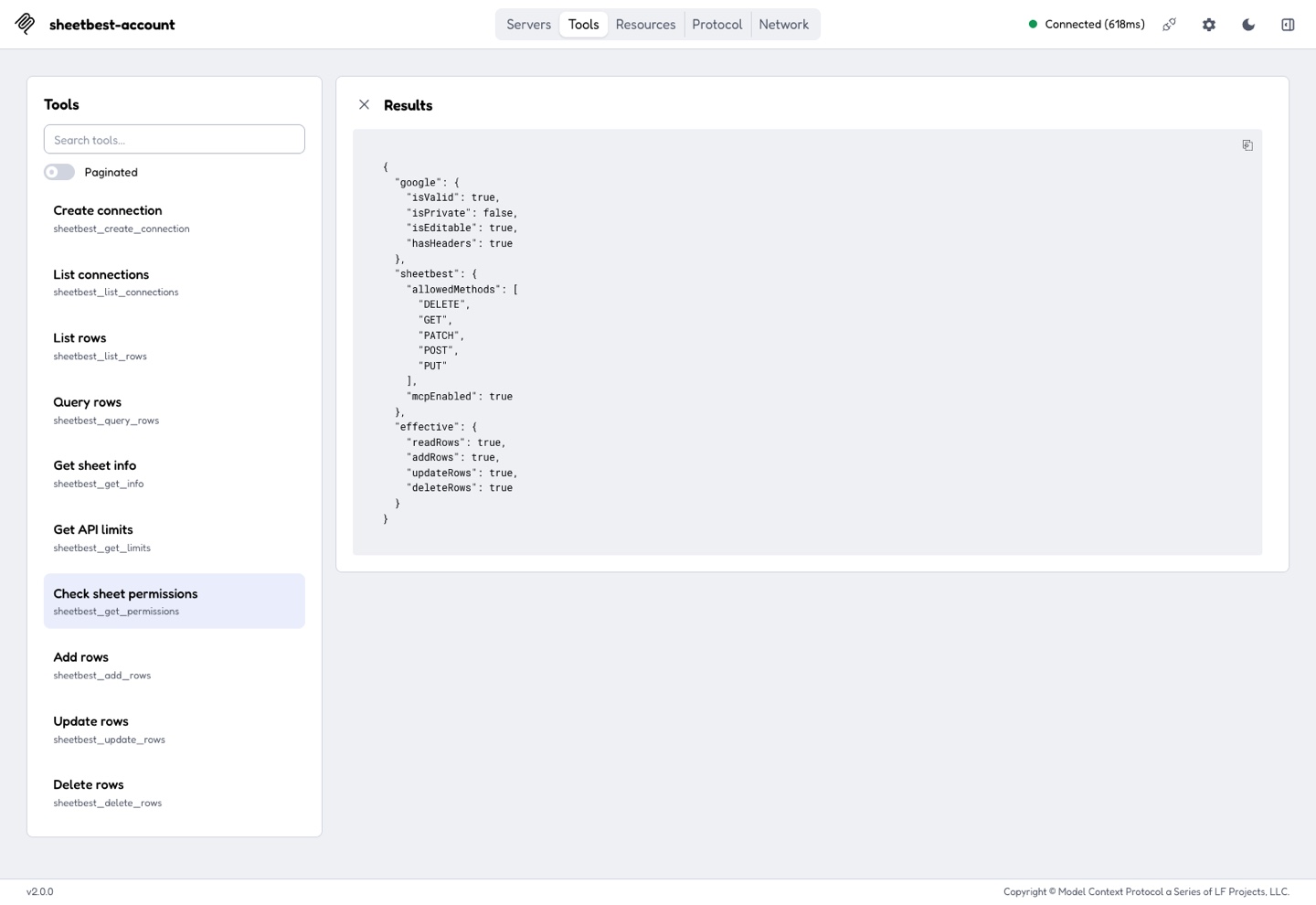
If the permission check succeeds, you can also test the data path:
List the first 10 rows.
This read is harmless, but it counts as a successful API request. If either check fails, use the matching error or symptom below.
The client cannot connect
Likely causes
- The server URL is incomplete or points to the wrong environment.
- The client did not send the token as a bearer credential.
- The client does not support remote Streamable HTTP MCP servers.
- A browser client's origin is not approved.
Verify
- Open Settings → Integrations → AI assistants · MCP and copy the Account endpoint again.
- Confirm the token field begins with
sbmcp_; do not paste the token into the URL. - Confirm your client supports a remote MCP server and bearer authentication.
- Check whether the client reports
missing_token,invalid_token, or an origin error.
Recover
Reconnect using the copied endpoint and stored token. Replace the token if you cannot verify its value. For an origin error, contact support with the client name, version, and origin.
The token is rejected
| Code | Likely cause | Recovery |
|---|---|---|
missing_token | The account endpoint received no bearer token. | Add your MCP token in the client's authentication setting. |
invalid_token | The token is mistyped or no longer active. | Copy the stored token again or replace it in Settings → Integrations. |
revoked_token | The credential was revoked or replaced. | Generate a new token and update this client. |
mcp_disabled | Account-level MCP support is off. | Turn MCP support on. The retained token resumes unless it was also revoked. |
If several clients stopped together, check whether someone replaced the single active token.
A connection endpoint returns 404
Sheet Best uses 404 when a connection is missing, archived, MCP-disabled, or
not owned by the token's user. This prevents one user from discovering another
user's connection.
Verify
- Run
sheetbest_list_connectionson the account endpoint. - Compare the returned
directMcpUrlwith the server URL in your client. - Check
mcpEnabledand whether the connection is archived.
Recover
Use the returned URL. Restore an archived connection if appropriate. If a
connection reports mcpEnabled: false, enable MCP access on its Sheet Best
connection page.
An expected tool is missing
Likely causes
- The required method is disabled in Advanced Settings → Methods.
- Your plan does not include the required feature.
- The client cached an earlier tool list.
Verify and recover
- On the account endpoint, confirm the tool call includes
connection_id. On a direct endpoint, confirm the URL contains/connections/<connection_id>. - Review the tool requirements.
- Enable the required connection method if the operation should be allowed.
- Reconnect or refresh the MCP server.
sheetbest_get_info also requires a plan with advanced-query access.
Aggregate, pivot, resources, and streaming are not available through the
current MCP server.
Google access or sheet checks fail
| Code | What to check | Recovery |
|---|---|---|
sheet_access_denied | Sheet sharing and the Google account used by Sheet Best | Grant Viewer access for reads or Editor access for writes. |
sheet_access_check_failed | Temporary Google authorization or access issue | Check access, then retry the permission tool. |
upstream_sheet_not_found | The source sheet was deleted, moved, or is no longer accessible | Restore the sheet or create a connection to the correct URL. |
upstream_permission_denied | Google denied the requested operation | Grant the authorized account the required sheet permission. |
invalid_sheet_url | The URL is not a native Google Sheet URL | Use a URL beginning with https://docs.google.com/spreadsheets/d/. |
Run sheetbest_get_permissions. google.isEditable must be true for writes.
For private sheets, see Private Sheets.
The sheet has no valid headers
malformed_sheet_content usually means the first row does not provide valid
column names.
- Open the affected tab.
- Put a non-empty, usable header in the first row of every column you need.
- Remove merged or malformed header cells.
- Run
sheetbest_get_permissionsagain.
See Prepare your Sheet.
A plan or quota blocks the operation
| Code | Meaning | Recovery |
|---|---|---|
quota_exceeded | The account has no requests remaining. | Wait for renewal or upgrade the plan. |
trial_expired | The trial no longer permits the operation. | Activate a paid plan. |
plan_required | The operation needs a feature not included in the current plan. | Use an eligible plan or choose another tool. |
method_not_allowed | The connection does not allow the tool's logical method. | Enable that method in connection settings if it is appropriate. |
Call sheetbest_get_limits to inspect limit, remaining, and plan without
consuming quota. sheetbest_get_permissions shows allowed and effective
actions.
The tool reports invalid arguments
invalid_arguments means the call did not match the advertised tool schema.
Common examples:
limitis below 1 or above 1000;offsetis negative;- a query value does not start with a supported operator;
- an update or delete supplies both
indexandcolumns, or neither; - a row payload is empty or uses unexpected argument names.
Ask the client to refresh the tool list, then retry with the documented tool inputs.
The output is too large
output_too_large means the result exceeded the MCP response-size limit.
Reduce limit, use a narrower columns or query filter, or increase
offset to retrieve the next page. A failed oversized response does not record
a successful API request.
Data looks stale after a write
When working with the first tab, omitting tab and explicitly passing the first
tab's name use different short-lived cache paths.
Recover
- Use the same
tabform for related reads and writes. - Retry after the connection's cache interval if you already mixed the two forms.
This does not affect writes to a different named tab.
Replacing a token broke another client
Sheet Best permits one active MCP token per user. Replace token invalidates the previous token immediately for every configured client.
Update all trusted clients with the replacement. If you no longer have the raw value, replace it again and store the new token before closing the dialog.
An operation fails without a specific code
For operation_failed, retry once. Then:
- Run
sheetbest_get_permissions. - Check the connection's allowed methods and Google access.
- Confirm the sheet still has valid headers.
- Note the client name, connection name, tool, time, and error code.
Do not include your token, API key, private sheet URL, or row contents when contacting Sheet Best support.
For non-MCP REST errors, use the general troubleshooting guide and error-code reference.
Next step
Return to the MCP quickstart after correcting the connection or credential.